
Introduction
In today’s digital world, cybercrime has become one of the most pressing threats for individuals, businesses, and governments alike. Among these threats, ransomware attacks have emerged as one of the most dangerous and widespread forms of cyberattacks. A ransomware attack involves malicious software that locks your files or systems, demanding a ransom to restore access. These attacks can cripple businesses, disrupt essential services, and even affect personal data security. With the rise of remote work, cloud storage, and online transactions, the risk of ransomware attacks has significantly increased.
Staying informed about ransomware attack updates is crucial to protecting yourself and your organization. By understanding how these attacks evolve, you can take proactive measures to prevent data loss, financial damage, and reputational harm. Ransomware attack updates provide the latest information about new attack methods, trends, and security recommendations, helping both beginners and intermediate users stay ahead of potential threats.
What is a Ransomware Attack?
A ransomware attack is a type of cyberattack where hackers use malicious software to encrypt a victim’s files or lock their system, demanding payment—usually in cryptocurrency—to regain access. This malware spreads through phishing emails, malicious downloads, unpatched software vulnerabilities, and compromised websites.
The process of a ransomware attack typically follows these steps:
- Infiltration: Hackers gain access to your system through phishing emails, infected downloads, or unprotected networks.
- Encryption: The malware encrypts files, rendering them inaccessible.
- Ransom Demand: A message appears demanding payment in exchange for decryption keys.
- Decision Point: Victims must decide whether to pay the ransom or attempt recovery through backups and security solutions.
There are different types of ransomware, including:
- Crypto-ransomware: Encrypts files and demands a ransom for the decryption key.
- Locker ransomware: Locks the entire system, preventing access until a ransom is paid.
- Double extortion ransomware: Encrypts data and threatens to leak sensitive information if payment isn’t made.
Understanding ransomware is the first step in preventing attacks. By knowing the mechanisms hackers use, you can implement safeguards that reduce your risk.
Why is Tracking Ransomware Attack Updates Important?
Keeping up with ransomware attack updates is essential for several reasons:
- New Threats Emerge Constantly: Hackers continuously develop new ransomware strains and attack methods.
- Timely Response: Updated information allows you to respond quickly, minimizing damage.
- Security Planning: Organizations can strengthen their defenses with the latest patches, security tools, and strategies.
- Awareness of Vulnerabilities: Updates reveal which industries or systems are currently most targeted.
- Regulatory Compliance: Many industries require up-to-date cybersecurity measures to comply with regulations.
For individuals and businesses, understanding ransomware trends helps in preparing better strategies. Whether it’s updating software, backing up data, or training employees, ransomware attack updates are critical for proactive security management.
Detailed Step-by-Step Guide to Handling Ransomware Attacks
Step 1: Prevention is Better Than Cure
Preventing ransomware is always more effective than dealing with its consequences.
- Use Reliable Antivirus Software: Ensure your antivirus is up-to-date and capable of detecting ransomware.
- Regular Software Updates: Patch all systems, including operating systems and applications, to fix vulnerabilities.
- Email Caution: Avoid clicking on suspicious links or downloading attachments from unknown sources.
- Network Security: Use firewalls, secure Wi-Fi, and VPNs to protect against unauthorized access.
Step 2: Data Backup Strategy
Regular backups are a lifesaver during a ransomware attack.
- Offline Backups: Keep backups disconnected from the network to prevent malware infection.
- Cloud Backups: Use reputable cloud services with strong security measures.
- Automated Backup Systems: Set backups to run regularly, ensuring you always have the latest data.
Step 3: Immediate Response During an Attack
If a ransomware attack occurs, acting quickly can reduce damage.
- Disconnect from the Network: Immediately isolate affected systems to prevent spreading.
- Identify the Ransomware: Tools like ID Ransomware can help recognize the type of ransomware.
- Do Not Pay Ransom Immediately: Paying does not guarantee data recovery and encourages hackers.
- Use Decryption Tools: Some ransomware has free decryption tools provided by cybersecurity experts.
Step 4: Post-Attack Recovery
Recovering after an attack requires careful steps:
- Restore from Backups: Use clean backups to restore your systems.
- System Scan: Conduct a thorough scan to ensure all malware is removed.
- Update Security Measures: Patch vulnerabilities and update antivirus software.
- Monitor Systems: Keep an eye on logs and network activity for any signs of reinfection.
Step 5: Reporting and Awareness
- Report to Authorities: Notify local cybercrime agencies to help track and combat ransomware.
- Employee Training: Educate staff about ransomware prevention and phishing awareness.
- Security Audits: Regularly audit your systems to identify weak points.
Benefits of Following Ransomware Attack Updates
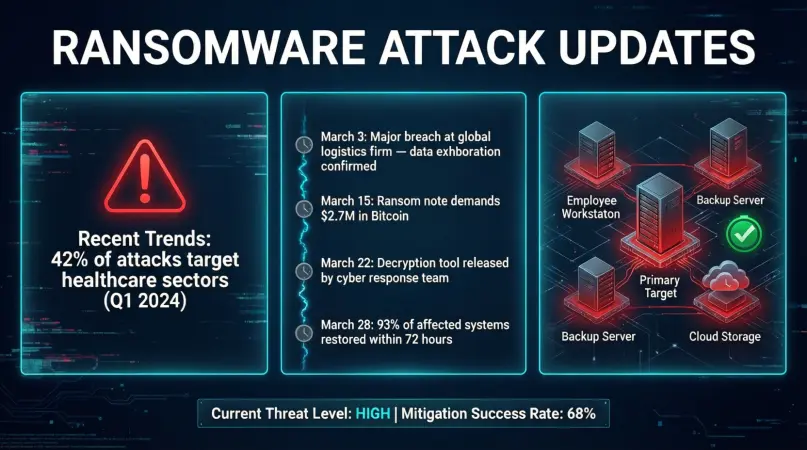
Staying informed about ransomware attacks provides numerous advantages:
- Proactive Defense: Anticipate threats and act before they cause damage.
- Financial Protection: Minimize losses by avoiding ransom payments and downtime.
- Data Security: Protect sensitive information from theft or corruption.
- Business Continuity: Maintain operations with minimal disruption.
- Enhanced Awareness: Stay updated on the latest tactics used by cybercriminals.
- Regulatory Compliance: Stay compliant with cybersecurity laws and standards.
Disadvantages / Risks of Ransomware Attacks
While updates can help, ransomware attacks still carry significant risks:
- Financial Losses: Ransom payments and downtime can be expensive.
- Data Loss: Encrypted or stolen files may never be recovered.
- Reputation Damage: Public breaches can harm brand credibility.
- Operational Disruption: Systems may remain inaccessible for extended periods.
- Legal Consequences: Failure to secure data may lead to fines or lawsuits.
- Targeted Attacks: Critical sectors like healthcare or finance are often prime targets.
Common Mistakes to Avoid
Avoiding mistakes can significantly reduce the risk of a ransomware attack:
- Ignoring Updates: Failing to patch software leaves systems vulnerable.
- Weak Passwords: Using simple or repeated passwords can be exploited by hackers.
- Unsecured Backups: Backups connected to the network can be compromised.
- Paying the Ransom: This may encourage further attacks and doesn’t guarantee recovery.
- Lack of Employee Training: Uninformed staff are a common entry point for attacks.
- Skipping Security Audits: Not reviewing system vulnerabilities can allow attacks to succeed.
FAQs About Ransomware Attack Updates
1. What is the latest ransomware attack trend?
Recent ransomware attacks often involve double extortion, where hackers encrypt data and threaten to leak it unless the ransom is paid. Industries like healthcare, finance, and education are increasingly targeted.
2. How can I protect my personal data from ransomware?
Regularly back up your files, update software, avoid suspicious emails, and use strong passwords. Antivirus programs and firewalls provide an extra layer of security.
3. Is it safe to pay a ransom?
Paying a ransom is risky. Hackers may not provide the decryption key, and payment encourages future attacks. Recovery through backups is the safer option.
4. Can ransomware attack smartphones?
Yes. Mobile ransomware exists and can lock devices or encrypt files. Avoid downloading apps from untrusted sources and keep your phone updated.
5. How quickly should I respond to a ransomware attack?
Immediate action is crucial. Disconnect the affected system from the network, identify the ransomware, and start recovery steps. Delays can increase damage.
6. Are all ransomware attacks preventable?
While not all attacks can be fully prevented, following security best practices—such as regular backups, software updates, and phishing awareness—significantly reduces the risk.
7. Can ransomware affect cloud storage?
Yes. Cloud storage linked to infected devices can be compromised. Use strong passwords, enable two-factor authentication, and maintain offline backups.
8. How do I stay updated on ransomware attacks?
Follow cybersecurity news, subscribe to alert services, and monitor updates from security organizations. Staying informed helps in proactive defense.
Expert Tips & Bonus Points
- Use Multi-Layered Security: Combine antivirus, firewall, VPN, and intrusion detection systems for strong protection.
- Segment Networks: Separate critical systems from general networks to limit ransomware spread.
- Practice Incident Drills: Regularly simulate attacks to train staff and test recovery procedures.
- Monitor Threat Intelligence: Use platforms that track emerging ransomware strains and tactics.
- Enable Two-Factor Authentication: Add an extra layer of security for sensitive accounts.
- Regular Security Audits: Conduct comprehensive audits to identify vulnerabilities before attackers do.
- Keep Communication Ready: Plan how to inform stakeholders without causing panic if an attack occurs.
Conclusion
Ransomware attacks are one of the most serious cyber threats today, affecting individuals, businesses, and even critical infrastructure. Staying updated with the latest ransomware attack trends is essential for protection, prevention, and effective recovery. By understanding what ransomware is, following step-by-step prevention and response strategies, avoiding common mistakes, and leveraging expert tips, you can significantly reduce the risk and impact of these attacks.
Being proactive is key. Regular software updates, reliable backups, employee awareness, and robust security measures form the foundation of ransomware resilience. The more informed you are about ransomware attack updates, the better equipped you are to safeguard your data, finances, and reputation.