
Introduction
In today’s digital world, protecting your private information has become more critical than ever. Every day, we share personal details online—our names, emails, phone numbers, bank accounts, and even sensitive documents. While technology makes life easier, it also exposes us to potential risks. Hackers, scammers, and identity thieves are always looking for opportunities to misuse personal information.
Knowing how to protect private information is not just about keeping your data safe online; it also involves securing your personal life offline. From using strong passwords to avoiding suspicious links, there are many steps you can take to prevent unauthorized access to your data. This guide will explain the importance of privacy protection, practical strategies to safeguard your information, common mistakes to avoid, and expert tips to stay safe.
What is Protecting Private Information?
Protecting private information means keeping your personal data secure from unauthorized access, misuse, or theft. It includes any information that can identify you, such as:
- Full name, address, and phone number
- Email accounts and login credentials
- Social security or national ID numbers
- Bank and credit card details
- Medical records or health information
- Personal photos, videos, or messages
Protection involves both digital and physical measures. Digitally, it includes using strong passwords, secure websites, and encrypted communication. Physically, it means safeguarding documents, devices, and even conversations from prying eyes. Essentially, it’s about controlling who can access your private information and ensuring it’s only shared with trusted sources.
Why is Protecting Private Information Important?

Protecting your private information is crucial for several reasons:
- Prevent Identity Theft: Hackers can steal personal information to commit fraud or open accounts in your name.
- Secure Financial Data: Protecting bank and card information helps prevent unauthorized transactions.
- Maintain Online Privacy: Social media and online services often collect data. Securing your accounts keeps your personal life private.
- Avoid Scams: Many phishing attacks rely on personal information. Being cautious helps you avoid falling victim.
- Protect Professional Reputation: Sensitive work-related information or emails can impact your career if exposed.
- Peace of Mind: Knowing your private data is safe reduces stress and worry in daily life.
In short, personal information is valuable. Losing control over it can have long-term consequences, both financially and emotionally.
Detailed Step-by-Step Guide to Protect Private Information
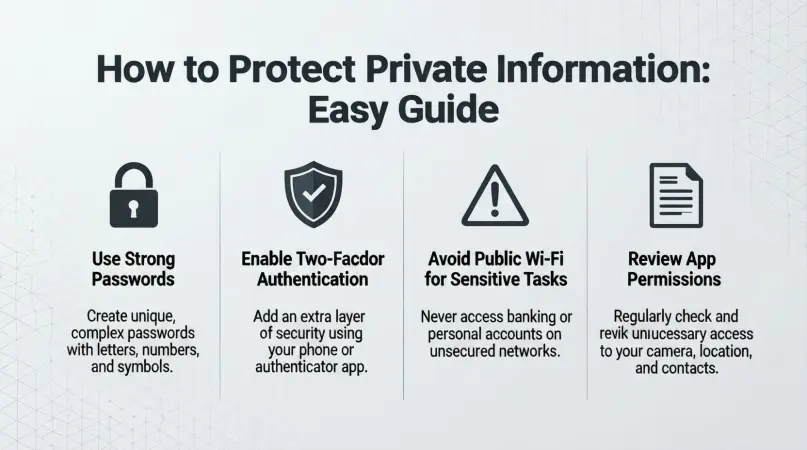
1. Use Strong Passwords and Authentication
Passwords are the first line of defense. Follow these tips:
- Create long passwords with at least 12 characters.
- Mix letters (upper and lower case), numbers, and symbols.
- Avoid using easily guessed information, like birthdays or pet names.
- Use a different password for every account.
- Enable two-factor authentication (2FA) wherever possible.
Example: Instead of “John123,” use “J0hn$ecure!2026.”
2. Secure Your Devices
Your smartphone, laptop, and tablet store a lot of personal data. Protect them by:
- Using passcodes or biometric locks (fingerprint/face ID).
- Keeping your operating system and apps updated.
- Installing reliable antivirus or security software.
- Avoiding public Wi-Fi for sensitive transactions.
- Encrypting your hard drives and backups.
3. Be Cautious with Online Sharing
Oversharing information online increases risk. To stay safe:
- Limit personal details on social media.
- Avoid posting travel plans, home addresses, or sensitive documents.
- Check privacy settings regularly.
- Think before sharing photos or videos.
4. Recognize and Avoid Scams
Cybercriminals often trick users into giving information. Protect yourself by:
- Not clicking unknown email links.
- Avoiding suspicious messages from unknown contacts.
- Verifying the authenticity of websites before entering information.
- Ignoring too-good-to-be-true offers online.
5. Use Secure Networks and Communication
When sharing information, ensure it’s secure:
- Use websites with HTTPS encryption.
- Prefer secure messaging apps with end-to-end encryption.
- Avoid sending sensitive data over email when possible.
- Use virtual private networks (VPNs) on public networks.
6. Manage Financial Information Safely
Financial data is highly sensitive. Protect it by:
- Using secure payment methods.
- Checking bank statements regularly for suspicious activity.
- Avoiding storing credit card information online.
- Being cautious with mobile banking apps.
7. Regularly Backup Important Data
Backup your files to prevent loss due to theft, malware, or hardware failure:
- Use encrypted cloud storage.
- Keep offline backups in a secure location.
- Update backups frequently.
8. Shred or Dispose of Documents Properly
Physical information is just as important:
- Shred old bank statements, bills, or medical records.
- Destroy old storage devices before disposal.
- Avoid leaving personal papers in public or shared spaces.
Benefits of Protecting Private Information
- Prevents identity theft
- Secures financial accounts
- Protects personal and professional reputation
- Reduces risk of cyberattacks
- Increases online confidence and peace of mind
- Helps comply with legal requirements for sensitive data
- Keeps family and friends safe by avoiding exposure
Disadvantages / Risks of Not Protecting Private Information
- Financial loss from fraud or theft
- Hacked email and social media accounts
- Exposure to phishing and scams
- Compromised personal and professional reputation
- Legal consequences if sensitive data is leaked
- Stress and anxiety from potential misuse
- Loss of confidential work or school information
Common Mistakes to Avoid
- Using the same password for multiple accounts.
- Clicking links from unknown emails or messages.
- Sharing too much information on social media.
- Ignoring software updates or security patches.
- Storing sensitive data on unsecured devices.
- Failing to monitor financial statements regularly.
- Trusting unknown apps or websites with personal details.
FAQs
1. How can I tell if my information is at risk?
Look for unusual account activity, unexpected messages, or unauthorized transactions. Tools like identity monitoring services can help track breaches.
2. Is a password manager safe to use?
Yes, reputable password managers store complex passwords securely and help avoid repeating passwords across accounts.
3. Should I avoid public Wi-Fi completely?
Not necessarily. Use a VPN to encrypt your connection if you must access sensitive information on public Wi-Fi.
4. What is phishing, and how can I avoid it?
Phishing is when scammers try to trick you into giving personal data via fake emails or websites. Verify senders and don’t click unknown links.
5. How often should I update passwords?
It’s recommended to update important account passwords every 3–6 months or immediately if a breach occurs.
6. Can social media settings really protect my information?
Yes. Adjusting privacy settings controls who sees your posts, profile, and contact information, reducing exposure.
7. Are antivirus programs necessary if I’m careful online?
Yes. Even careful users can encounter malware or viruses. Antivirus software adds an extra layer of protection.
8. Is encryption really important?
Absolutely. Encryption ensures that even if someone accesses your data, they cannot read it without a key.
Expert Tips & Bonus Points
- Use a mix of passwords, PINs, and biometrics for layered security.
- Monitor your digital footprint by searching your name online occasionally.
- Set up account alerts for unusual activity.
- Avoid saving passwords in browsers; prefer a password manager.
- Educate family members and friends about online safety.
- Review app permissions and remove unnecessary access.
- Consider identity theft protection services for extra peace of mind.
- Regularly audit your email subscriptions to reduce spam exposure.
Conclusion
Protecting private information is no longer optional—it is essential in the modern world. From securing passwords to avoiding scams, taking proactive steps can save you from serious financial and personal consequences. By following the strategies outlined in this guide, you can confidently navigate online and offline spaces while keeping your data safe.
Remember, small habits like using strong passwords, enabling two-factor authentication, and being cautious with shared information make a big difference. Over time, these practices not only protect your personal and financial data but also create peace of mind. Privacy is valuable, and taking control of your information ensures that you stay safe, secure, and confident in every aspect of your digital life.