
Introduction
In today’s digital age, online privacy has become a major concern for everyone. Every time you browse the internet, use social media, shop online, or even check your email, your personal information can be tracked, stored, and sometimes misused. Understanding online privacy best practices is no longer optional—it is essential for protecting yourself from identity theft, cyberattacks, and unauthorized data sharing.
Online privacy refers to the measures and actions individuals take to control who accesses their personal information online. From social media accounts to online banking, everything you do online leaves behind a trail. Hackers, advertisers, and even some websites may exploit this data if proper precautions are not taken. By learning the right techniques, you can safeguard your digital life, maintain confidentiality, and enjoy the internet safely.
What is Online Privacy?
Online privacy, also known as internet privacy, refers to the protection of personal information shared or collected while using the internet. It involves controlling what data is collected about you, who can access it, and how it is used. Your online activities—like browsing websites, sending emails, or posting on social media—generate personal data, including your location, IP address, search history, and even financial details.
Online privacy encompasses several key aspects:
- Data Protection: Ensuring your personal information is not shared or stolen without consent.
- Anonymity: Keeping your identity hidden during online interactions.
- Control: Choosing what information you share and with whom.
- Security: Using tools and methods to protect data from hackers or third parties.
Without proper online privacy measures, sensitive data can be exposed to cybercriminals, advertisers, and even governments. This can lead to identity theft, financial loss, or unwanted tracking. Understanding online privacy best practices allows you to take control of your digital footprint and limit exposure to threats while enjoying the benefits of the internet.
Why is Online Privacy Important?
Online privacy is crucial for multiple reasons. In a connected world, every click, search, and social media post contributes to your digital profile. Here’s why prioritizing online privacy is essential:
- Protecting Personal Information: Sensitive details like your address, phone number, and banking information can be misused if exposed.
- Preventing Identity Theft: Cybercriminals can use stolen data to commit fraud or access your accounts.
- Maintaining Confidentiality: Your personal conversations, photos, and files remain private only when proper measures are in place.
- Avoiding Targeted Advertising: Companies track online behavior for marketing purposes; privacy controls help reduce unnecessary tracking.
- Ensuring Safe Online Communication: Privacy safeguards prevent eavesdropping or unauthorized monitoring of emails and messages.
- Reducing Cybersecurity Risks: By limiting exposure, you decrease the chances of malware, phishing, and ransomware attacks.
In short, practicing online privacy ensures a safer, more secure digital experience. It gives you control over your data, protects you from cyber threats, and allows you to use the internet confidently without compromising your personal information.
Detailed Step-by-Step Guide to Online Privacy Best Practices
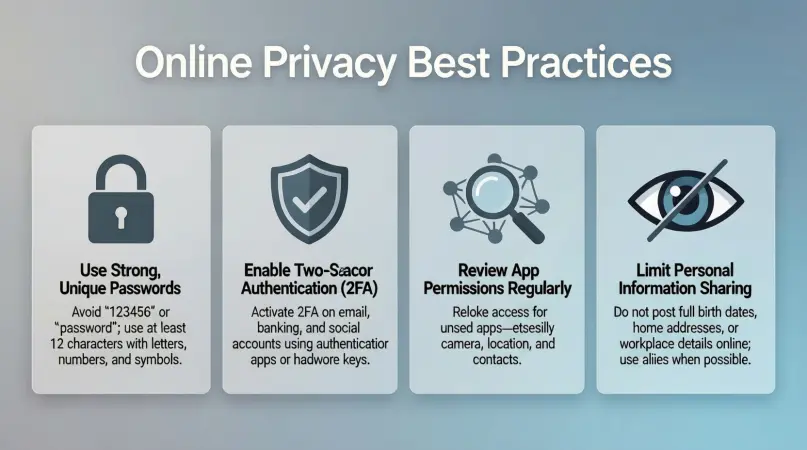
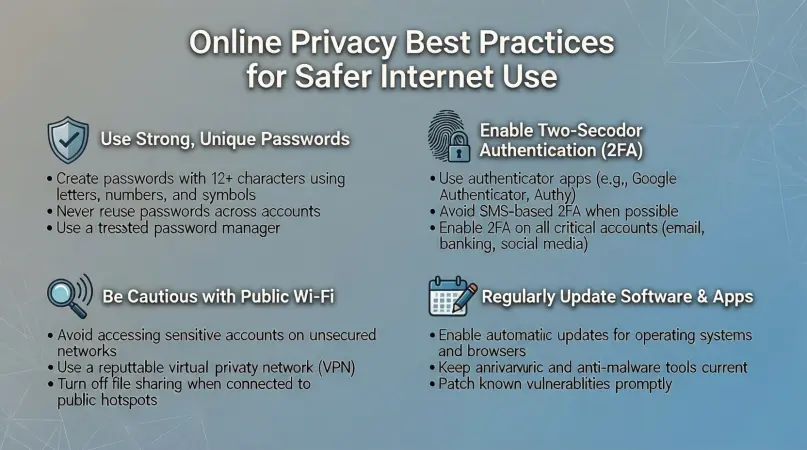
Here’s a complete step-by-step guide to implement online privacy best practices effectively:
1. Use Strong and Unique Passwords
Passwords are the first line of defense for your online accounts.
- Use a combination of uppercase and lowercase letters, numbers, and symbols.
- Avoid using common words, birthdays, or easily guessed information.
- Use unique passwords for every account to prevent one breach from affecting multiple accounts.
- Consider a password manager to generate and store strong passwords safely.
Example: Instead of “mypassword123,” use something like “G7!v9q@b2Lp#.”
2. Enable Two-Factor Authentication (2FA)
2FA adds an extra layer of security by requiring a second verification step, such as a code sent to your phone or an authentication app.
- Always enable 2FA on email, social media, and banking accounts.
- Use authenticator apps like Google Authenticator or Authy instead of SMS codes for better security.
3. Secure Your Devices
Your devices store a lot of sensitive information, making them a primary target for attackers.
- Use strong device passwords, PINs, or biometric authentication.
- Keep your operating system and apps updated to fix security vulnerabilities.
- Install antivirus or anti-malware software to detect and prevent threats.
- Enable device encryption to protect stored data.
4. Use a Virtual Private Network (VPN)
A VPN encrypts your internet connection, hiding your IP address and online activity from hackers and ISPs.
- Choose a reliable, paid VPN for better security and faster speeds.
- Use a VPN when accessing public Wi-Fi to prevent unauthorized access.
- Avoid free VPNs, as they may collect and sell your data.
5. Manage Privacy Settings
Most online platforms allow you to adjust privacy settings to control who can see your information.
- Review privacy options on social media, email, and cloud storage accounts.
- Limit personal information shared publicly.
- Disable location tracking when it’s unnecessary.
- Opt out of targeted advertising when possible.
6. Be Careful with Public Wi-Fi
Public Wi-Fi is convenient but often insecure.
- Avoid logging into sensitive accounts over public Wi-Fi.
- Use a VPN when connecting to public networks.
- Turn off automatic Wi-Fi connections to unknown networks.
7. Encrypt Your Communication
Encrypted communication ensures that only the intended recipient can read your messages.
- Use secure messaging apps like Signal or WhatsApp for private conversations.
- Enable end-to-end encryption for emails if possible.
8. Monitor Your Online Presence
Regularly check what information about you is available online.
- Search your name to see public records or profiles.
- Remove unnecessary personal information from websites and social media.
- Use privacy-focused search engines like DuckDuckGo for anonymous browsing.
9. Protect Your Financial Information
Online transactions are vulnerable to theft if not secured properly.
- Use secure payment gateways and avoid sharing card details via email.
- Monitor bank and credit card statements for unusual activity.
- Consider using virtual credit cards for online purchases.
10. Regular Backups and Updates
Regularly backing up your data ensures recovery in case of breaches or malware attacks.
- Store backups on external drives or secure cloud storage.
- Keep apps and systems updated to patch security vulnerabilities.
Benefits of Online Privacy Best Practices
Implementing online privacy strategies provides multiple benefits:
- Protects Personal Data: Keeps sensitive information safe from hackers and data breaches.
- Reduces Risk of Identity Theft: Makes it harder for cybercriminals to impersonate you.
- Improves Online Security: Prevents unauthorized access to accounts and devices.
- Enhances Online Freedom: Browse and communicate without constant monitoring.
- Minimizes Targeted Ads: Limits tracking and personalized advertising.
- Builds Confidence in Digital Transactions: Enables safer online shopping and banking.
- Maintains Professional Reputation: Protects work-related and personal information from leaks.
Disadvantages / Risks of Poor Online Privacy
Neglecting online privacy can lead to serious consequences:
- Identity Theft: Criminals may use your personal data for fraudulent activities.
- Financial Loss: Unauthorized transactions and scams can cause monetary damage.
- Data Breaches: Personal and sensitive information may be exposed publicly.
- Targeted Scams and Phishing: Hackers can craft attacks using your personal details.
- Loss of Reputation: Private photos, emails, or messages can be leaked.
- Tracking and Surveillance: Online behavior can be monitored and used without consent.
Common Mistakes to Avoid
Many people unintentionally compromise their online privacy. Avoid these errors:
- Using Weak Passwords: Simple passwords are easy for hackers to guess.
- Reusing Passwords Across Accounts: One hacked account can compromise many others.
- Ignoring Software Updates: Outdated apps and systems are vulnerable to attacks.
- Oversharing on Social Media: Posting too much personal information exposes you to risks.
- Using Public Wi-Fi Unsecured: Hackers can intercept sensitive data on open networks.
- Not Enabling 2FA: Skipping two-factor authentication leaves accounts less protected.
- Clicking Unknown Links: Phishing emails and malicious links can steal your information.
- Neglecting Backups: Losing data due to malware or device failure is preventable with backups.
FAQs About Online Privacy Best Practices
1. What is the easiest way to improve online privacy?
Using strong, unique passwords, enabling 2FA, and adjusting privacy settings on all accounts are the simplest steps anyone can take.
2. Are free VPNs safe for online privacy?
Most free VPNs have limitations and may track or sell your data. Paid VPNs offer better security and privacy.
3. How often should I update passwords?
Ideally, update passwords every 3–6 months, especially for sensitive accounts like email or banking.
4. Is social media dangerous for privacy?
Yes, oversharing on social media can expose personal information. Adjust privacy settings to limit visibility.
5. Can I browse the internet completely anonymously?
Complete anonymity is difficult, but using VPNs, privacy-focused browsers, and encrypted communication can significantly reduce tracking.
6. What should I do if my account is hacked?
Immediately change your passwords, enable 2FA, notify the service provider, and monitor your accounts for suspicious activity.
7. How do I prevent email tracking?
Use email services that block trackers and avoid opening emails from unknown senders.
8. Is public Wi-Fi safe for banking?
No, always use a VPN or avoid logging into banking accounts on public Wi-Fi.
9. How can I check what personal data is online?
Search your name and email address on search engines, and review social media and online accounts regularly.
10. Can antivirus software protect my privacy?
Yes, antivirus software protects against malware and phishing attacks that compromise personal information.
Expert Tips & Bonus Points
- Use Privacy-Focused Browsers: Browsers like Firefox and Brave block trackers by default.
- Limit App Permissions: Only give apps access to necessary data like camera or contacts.
- Regularly Clear Cookies and Cache: Reduces tracking by websites and advertisers.
- Avoid Third-Party Logins: Signing in with Facebook or Google can share your data with multiple services.
- Educate Yourself About Phishing: Learn to recognize suspicious emails and messages.
- Use Encrypted Cloud Services: Store sensitive data on services with end-to-end encryption.
- Consider a Secure Email Service: Providers like ProtonMail prioritize privacy and encryption.
- Monitor Digital Footprint: Regularly check your online presence and remove unnecessary personal information.
Conclusion
Online privacy is no longer optional in the modern digital world. By following online privacy best practices, you can protect your personal information, reduce cybersecurity risks, and enjoy the internet safely. From using strong passwords and enabling 2FA to managing privacy settings and using VPNs, every step you take adds a layer of protection to your digital life.
The key to effective online privacy is awareness and consistent action. Regularly reviewing your security measures, avoiding oversharing, and staying updated with the latest privacy tools will help you maintain control over your data. Remember, even small steps like clearing cookies, encrypting communications, and monitoring your accounts can make a huge difference.