
Introduction
In today’s digital world, phishing attacks are becoming increasingly common. Every day, cybercriminals use fake emails, websites, and messages to trick people into sharing sensitive information like passwords, bank details, or personal data. This makes understanding phishing alerts and prevention not just helpful but essential. Whether you are a beginner or have some experience online, knowing how to recognize phishing attempts can save you from major losses and identity theft.
Phishing attacks are clever, often appearing as legitimate emails from banks, social media platforms, or online stores. Many people fall victim because they do not notice subtle signs or lack proper knowledge about prevention. Fortunately, with awareness and a few practical steps, anyone can strengthen their online security. This guide will explain what phishing is, why it matters, and how you can prevent attacks effectively. By following the strategies outlined here, you can protect yourself, your family, and your digital assets from cybercrime.
What is Phishing?
Phishing is a type of cyberattack where criminals try to trick individuals into giving away sensitive information. The term comes from “fishing” because attackers lure victims with bait, such as fake emails, messages, or websites.
Here’s how phishing usually works:
- The Lure: You receive a message or email that seems legitimate, often mimicking a trusted company or person.
- The Hook: The message encourages you to click a link, download an attachment, or provide personal details.
- The Catch: Once you respond, attackers can steal your information, access your accounts, or install malicious software on your device.
Common forms of phishing include:
- Email phishing: Fake emails pretending to be banks, online stores, or social media platforms.
- Spear phishing: Targeted attacks aimed at specific individuals or organizations.
- SMS phishing (Smishing): Text messages that ask for personal details or direct you to malicious links.
- Voice phishing (Vishing): Phone calls pretending to be from trusted institutions, requesting confidential information.
The goal of phishing is usually financial gain or identity theft, making it a serious threat for anyone using the internet.
Why is Phishing Important to Address?
Phishing is more than just an annoying email. It has serious consequences for individuals and organizations alike. Here’s why addressing phishing alerts and prevention is critical:
- Financial Loss: Phishing can lead to stolen bank details or unauthorized transactions, causing significant monetary damage.
- Identity Theft: Attackers can use stolen personal data to commit fraud, open accounts in your name, or even commit crimes.
- Data Breaches: Organizations can suffer massive breaches if employees fall for phishing, exposing sensitive customer information.
- Reputation Damage: Both individuals and businesses may face reputation loss if phishing leads to leaks of private information.
- Malware Infection: Clicking on phishing links may install viruses, spyware, or ransomware on your devices.
Understanding the importance of phishing prevention ensures that you stay alert and take proactive measures to protect yourself and your data.
Detailed Step-by-Step Guide to Phishing Alerts and Prevention
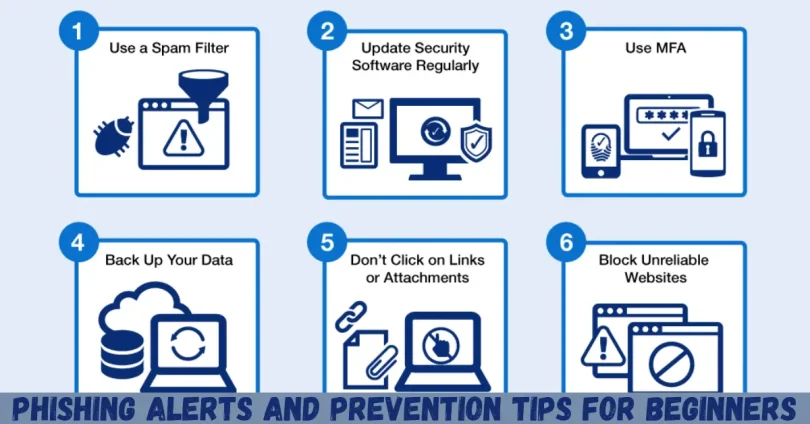
Protecting yourself from phishing involves awareness, technology, and good online habits. Below is a detailed guide to help you stay safe.
1. Recognize Phishing Emails and Messages
Learning to identify phishing attempts is the first step in prevention. Watch out for:
- Unusual sender addresses: Check if the email domain matches the official organization.
- Generic greetings: Messages that start with “Dear Customer” instead of your name.
- Spelling and grammar errors: Legitimate companies rarely send messages with mistakes.
- Urgent language: Phrases like “Act Now!” or “Your Account Will Be Closed” are common in phishing.
- Suspicious links: Hover over links to see the real URL before clicking.
2. Verify Before You Click
Before engaging with any message, verify its authenticity:
- Contact the company directly using official contact information.
- Type website URLs manually instead of clicking links.
- Check with colleagues or friends if the message seems unusual.
3. Use Strong Passwords and Two-Factor Authentication
Even if attackers get your username, strong passwords and 2FA make unauthorized access difficult:
- Create unique, complex passwords for every account.
- Use a password manager to store and generate secure passwords.
- Enable two-factor authentication on all important accounts for extra security.
4. Keep Software and Devices Updated
Phishing attacks often exploit vulnerabilities in outdated software:
- Regularly update your operating system, browser, and applications.
- Install antivirus and anti-malware programs.
- Enable automatic updates for security patches.
5. Educate Yourself and Others
Knowledge is a powerful defense against phishing:
- Attend online safety workshops or webinars.
- Teach family members, especially children and older adults, about phishing.
- Stay informed about new phishing techniques.
6. Use Anti-Phishing Tools and Filters
Modern tools can help you detect and prevent phishing:
- Email filters can automatically mark suspicious emails as spam.
- Browser extensions can block malicious websites.
- Security software often includes phishing detection features.
7. Report Suspicious Messages
Reporting phishing attacks helps protect others:
- Forward phishing emails to the company being impersonated.
- Report scams to government cybersecurity agencies.
- Inform your workplace IT department if it involves work-related messages.
8. Backup Your Data
In case of accidental compromise, having backups reduces risk:
- Use cloud storage or external drives for regular backups.
- Ensure backups are secure and not accessible by unauthorized users.
Benefits of Phishing Alerts and Prevention
Implementing phishing alerts and prevention measures offers many advantages:
- Protects Personal Information: Keeps passwords, credit card numbers, and other sensitive data safe.
- Reduces Financial Risks: Prevents unauthorized transactions and monetary loss.
- Maintains Reputation: Safeguards both personal and professional credibility.
- Minimizes Stress: Reduces anxiety about falling victim to scams.
- Prevents Malware Infections: Protects devices from viruses, spyware, and ransomware.
- Supports Safe Online Habits: Encourages careful digital behavior.
Disadvantages / Risks
While prevention is essential, there are minor challenges to consider:
- Time-Consuming: Learning and applying all safety measures can take effort.
- False Positives: Legitimate messages may sometimes be flagged as phishing.
- Costs: Security software and tools may have subscription fees.
- Complexity: Some preventive methods, like 2FA or password managers, may confuse beginners initially.
Despite these minor drawbacks, the benefits of phishing prevention far outweigh the risks.
Common Mistakes to Avoid
Avoid these pitfalls to stay secure online:
- Clicking Links Without Verification: Always check links before clicking.
- Ignoring Security Updates: Outdated software is more vulnerable.
- Reusing Passwords: Using the same password across accounts increases risk.
- Neglecting Two-Factor Authentication: Skipping 2FA makes accounts easier to hack.
- Sharing Sensitive Information Over Email: Legitimate organizations rarely ask for passwords or PINs via email.
- Overlooking Suspicious Signs: Pay attention to urgency, spelling errors, or unknown senders.
FAQs About Phishing Alerts and Prevention
1. What is the easiest way to spot phishing emails?
Check for suspicious sender addresses, generic greetings, grammatical errors, urgent requests, and unknown links. Hover over links to verify their destination.
2. Can phishing happen on social media?
Yes, attackers use direct messages, fake friend requests, and fake posts to trick users into sharing personal information.
3. Is antivirus software enough to prevent phishing?
Antivirus helps but is not sufficient alone. Combining it with awareness, strong passwords, 2FA, and cautious behavior provides stronger protection.
4. How does two-factor authentication help against phishing?
Even if attackers steal your password, 2FA requires a second verification step, like a text code or authentication app, preventing unauthorized access.
5. What should I do if I accidentally click a phishing link?
Disconnect from the internet immediately, scan your device for malware, change passwords, and monitor accounts for suspicious activity.
6. Are phishing attacks only emails?
No. Phishing can occur via SMS, social media, phone calls, and even malicious websites.
7. Can companies prevent phishing completely?
No system is 100% secure, but regular training, monitoring, and technology reduce the risk significantly.
8. How often should I change my passwords to stay safe?
It’s recommended to change passwords every 3–6 months, especially for sensitive accounts, or immediately if you suspect a compromise.
Expert Tips & Bonus Points
- Use a Virtual Private Network (VPN): Encrypts internet traffic and hides your IP address.
- Check Website Security: Look for HTTPS and security certificates before entering data.
- Be Skeptical: If a deal seems too good to be true, it probably is.
- Use Password Managers: Generates strong, unique passwords for all accounts.
- Enable Email Authentication Features: SPF, DKIM, and DMARC reduce email spoofing risks.
- Stay Updated: Cybercriminals continuously evolve their tactics, so stay informed about new scams.
Conclusion
Phishing attacks are a serious threat in the digital age, but with the right knowledge and tools, you can protect yourself. By understanding phishing alerts and prevention, you reduce the risk of financial loss, identity theft, and malware infections. Simple habits like verifying links, using strong passwords, enabling two-factor authentication, and staying updated can make a huge difference in online security.
Remember, awareness is your first line of defense. Educate yourself and others, stay vigilant against suspicious messages, and report phishing attempts when necessary. While cyber threats continue to evolve, consistent precautionary steps empower you to stay safe online. Taking phishing prevention seriously is not just a tech issue—it’s a crucial life skill in today’s connected world. Protect your data, safeguard your accounts, and surf the internet with confidence.