
Introduction
In today’s digital world, personal information is more valuable than ever. From social media accounts to online shopping, nearly every interaction leaves behind traces of your data. Understanding data privacy for beginners is essential to protect yourself from identity theft, hacking, and unwanted surveillance. While many people assume privacy is automatically taken care of by technology, the truth is that most users are vulnerable without proper knowledge and proactive measures.
For beginners, the term “data privacy” may sound technical or complicated, but it’s actually quite simple once you break it down. It involves understanding how your personal information is collected, stored, shared, and used, and taking steps to control who can access it. Even small mistakes, like using weak passwords or oversharing on social media, can put your information at risk.
What is Data Privacy?
Data privacy, also known as information privacy, refers to the proper handling, processing, and protection of personal information. Personal data can include anything from your name, address, and phone number to your online behavior, search history, and financial details.
The main goal of data privacy is to ensure that your personal information is collected and used only with your consent and protected from unauthorized access. For example, when a website asks for your email to send a newsletter, data privacy rules ensure that your email is not shared with third parties without your permission.
In simple terms, data privacy is about knowing what data is collected, who has access to it, and how it is used. It also includes measures to prevent misuse, such as hacking, identity theft, or online tracking. Understanding the basics of data privacy empowers users to protect themselves and make smarter online decisions.
Why is Data Privacy Important?
Data privacy is crucial for several reasons, especially in an era dominated by digital communication and online transactions.
- Protection from Identity Theft: Cybercriminals can steal personal data like your social security number, bank details, or login credentials. This can lead to financial loss or fraud.
- Online Security: By controlling who can access your data, you reduce the risk of hacking and malware attacks.
- Personal Freedom: When your data is private, you maintain control over your personal information instead of letting companies or individuals track your behavior.
- Legal Compliance: Many countries have strict regulations regarding data privacy, like GDPR in Europe or CCPA in California. Ignoring data privacy can lead to fines or legal trouble.
- Peace of Mind: Knowing your personal data is protected allows you to use online services confidently without constantly worrying about breaches or misuse.
Data privacy is not just a technical issue—it’s a matter of personal safety, financial security, and digital freedom. Neglecting it can lead to long-term consequences that are often difficult to reverse.
Detailed Step-by-Step Guide to Data Privacy
Step 1: Understand the Types of Personal Data
Before protecting your information, it’s important to know what counts as personal data.
- Personally Identifiable Information (PII): Name, address, phone number, email, social security number.
- Financial Data: Bank account numbers, credit card details, transaction history.
- Health Information: Medical records, prescriptions, insurance details.
- Digital Behavior: Browsing history, search queries, social media activity, cookies.
Understanding these categories helps you focus on protecting the most sensitive information first.
Step 2: Strengthen Your Passwords
Passwords are the first line of defense against unauthorized access.
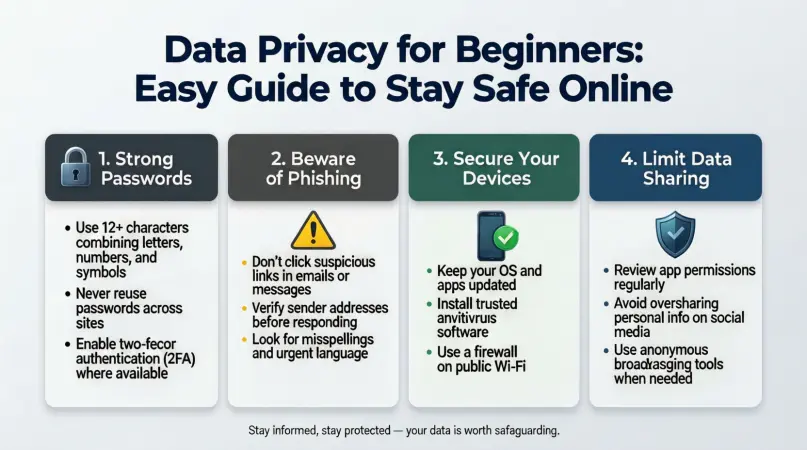
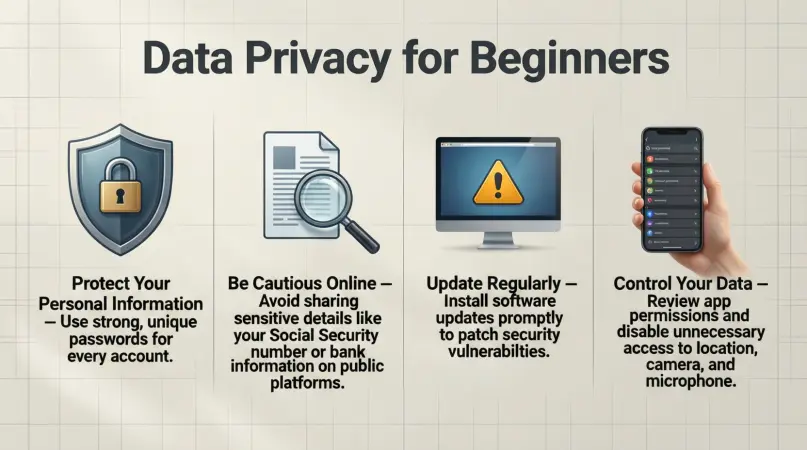
- Use strong, unique passwords for each account.
- Combine letters (uppercase and lowercase), numbers, and special characters.
- Consider using a password manager to safely store and generate passwords.
- Avoid obvious passwords like “123456” or “password.”
Strong passwords make it harder for hackers to gain access to your accounts.
Step 3: Enable Two-Factor Authentication (2FA)
Two-factor authentication adds an extra layer of security by requiring a second form of verification.
- Use SMS codes, authentication apps, or biometric verification like fingerprints.
- Most social media platforms, email providers, and financial services support 2FA.
- Even if a hacker gets your password, 2FA helps prevent unauthorized access.
2FA significantly reduces the chances of identity theft.
Step 4: Manage Privacy Settings on Social Media
Social media platforms collect vast amounts of personal information. Adjusting privacy settings can protect your data.
- Limit who can see your posts and personal information.
- Disable location sharing unless necessary.
- Review connected apps and remove those you don’t use.
- Be cautious about accepting friend requests or messages from strangers.
These steps help reduce the risk of your personal information being misused online.
Step 5: Secure Your Devices
Data privacy isn’t just about online accounts—it’s also about securing your devices.
- Keep your operating system and apps updated to fix security vulnerabilities.
- Use antivirus software to detect and block malware.
- Encrypt sensitive files on your computer or phone.
- Avoid using public Wi-Fi for sensitive transactions, or use a VPN when necessary.
Device security ensures that even if your data is targeted, it remains protected.
Step 6: Be Careful with Emails and Phishing Scams
Phishing attacks trick you into giving away personal information.
- Don’t click on suspicious links or attachments.
- Verify the sender’s email address before responding.
- Look for spelling mistakes or unusual requests, which often indicate scams.
- Use email filters and anti-phishing tools to reduce risk.
Awareness of phishing techniques is a crucial aspect of data privacy.
Step 7: Limit Data Sharing with Companies
Many websites collect data to improve services or for marketing. You can limit unnecessary sharing.
- Read privacy policies before signing up.
- Opt out of unnecessary data collection or marketing emails.
- Use browser extensions that block trackers and ads.
- Avoid sharing sensitive data unless it is absolutely necessary.
Limiting data sharing minimizes your digital footprint and reduces exposure to potential risks.
Step 8: Regularly Monitor Your Accounts
Keeping track of your accounts helps detect unusual activity early.
- Check bank statements and credit reports regularly.
- Review account login history for suspicious activity.
- Set alerts for large transactions or unusual account changes.
- Freeze accounts if you suspect a breach.
Early detection can prevent bigger problems in case your information is compromised.
Benefits of Data Privacy
Protecting your personal information provides several advantages:
- Prevents identity theft and financial fraud.
- Maintains personal and professional reputation.
- Reduces risk of online harassment or stalking.
- Ensures compliance with data protection laws.
- Promotes safer online experiences for you and your family.
- Gives you peace of mind in digital interactions.
When practiced consistently, data privacy empowers you to navigate the online world confidently.
Disadvantages / Risks of Poor Data Privacy
Neglecting data privacy can lead to serious consequences:
- Exposure to identity theft and financial loss.
- Targeted scams and phishing attacks.
- Unauthorized access to personal accounts.
- Loss of sensitive or confidential information.
- Legal issues due to non-compliance with privacy regulations.
- Reduced control over your personal life and digital presence.
Ignoring privacy can have both immediate and long-term effects on your security and reputation.
Common Mistakes to Avoid
Even with good intentions, beginners often make mistakes that compromise data privacy:
- Reusing the same password across multiple accounts.
- Oversharing personal information on social media.
- Ignoring software and app updates.
- Clicking on unknown links or downloading suspicious files.
- Using public Wi-Fi without protection.
- Not reading privacy policies or ignoring permission requests.
Avoiding these mistakes can drastically improve your online security and maintain your data privacy.
FAQs on Data Privacy for Beginners
1. What is the difference between data privacy and data security?
Data privacy focuses on controlling how personal data is collected, used, and shared. Data security focuses on protecting that data from unauthorized access or breaches. Both work together to safeguard your information.
2. Is my data really safe online?
No system is 100% safe, but taking precautions like strong passwords, 2FA, and monitoring accounts significantly reduces risks. Staying informed is key.
3. Can companies legally share my data without permission?
In many countries, companies must obtain your consent before sharing personal data. However, some exceptions exist for legal or operational purposes. Reading privacy policies helps you understand your rights.
4. What is phishing, and how do I avoid it?
Phishing is a type of cyberattack where attackers trick you into revealing personal information. Avoid clicking on suspicious links, verify email senders, and use anti-phishing tools.
5. Are public Wi-Fi networks safe for online banking?
Public Wi-Fi is often insecure. Use a VPN or avoid sensitive transactions on public networks to protect your information.
6. How can I delete my personal information from websites?
You can contact websites to request deletion or use account settings to remove data. Some search engines also offer opt-out services for personal information.
7. What is a VPN, and do I need one?
A VPN (Virtual Private Network) encrypts your internet connection, making it safer to browse online. It’s especially useful on public networks or when you want to maintain anonymity.
8. How often should I update my passwords?
It’s recommended to update passwords every 3–6 months, especially for sensitive accounts like email, banking, or social media.
Expert Tips & Bonus Points
- Use password managers like LastPass or Bitwarden to generate and store strong passwords.
- Enable multi-device backups for important files to avoid data loss.
- Consider using encrypted messaging apps for private conversations.
- Regularly clear cookies and cache to reduce tracking by websites.
- Be cautious about granting app permissions; limit access to only necessary data.
- Stay informed about new data privacy laws in your country.
- Educate family members, especially children, about safe online practices.
By implementing these strategies, you strengthen your data privacy significantly and reduce the likelihood of breaches or misuse.
Conclusion
Data privacy is no longer optional; it is a vital aspect of living in the digital age. For beginners, understanding the basics may seem overwhelming at first, but taking it step by step makes it manageable. By learning about what data is collected, how it can be misused, and implementing protective measures, you gain control over your personal information.
The benefits of good data privacy practices go beyond security—they include peace of mind, legal compliance, and a safer online experience. Avoiding common mistakes and staying vigilant against threats ensures that your personal data remains private and secure.